
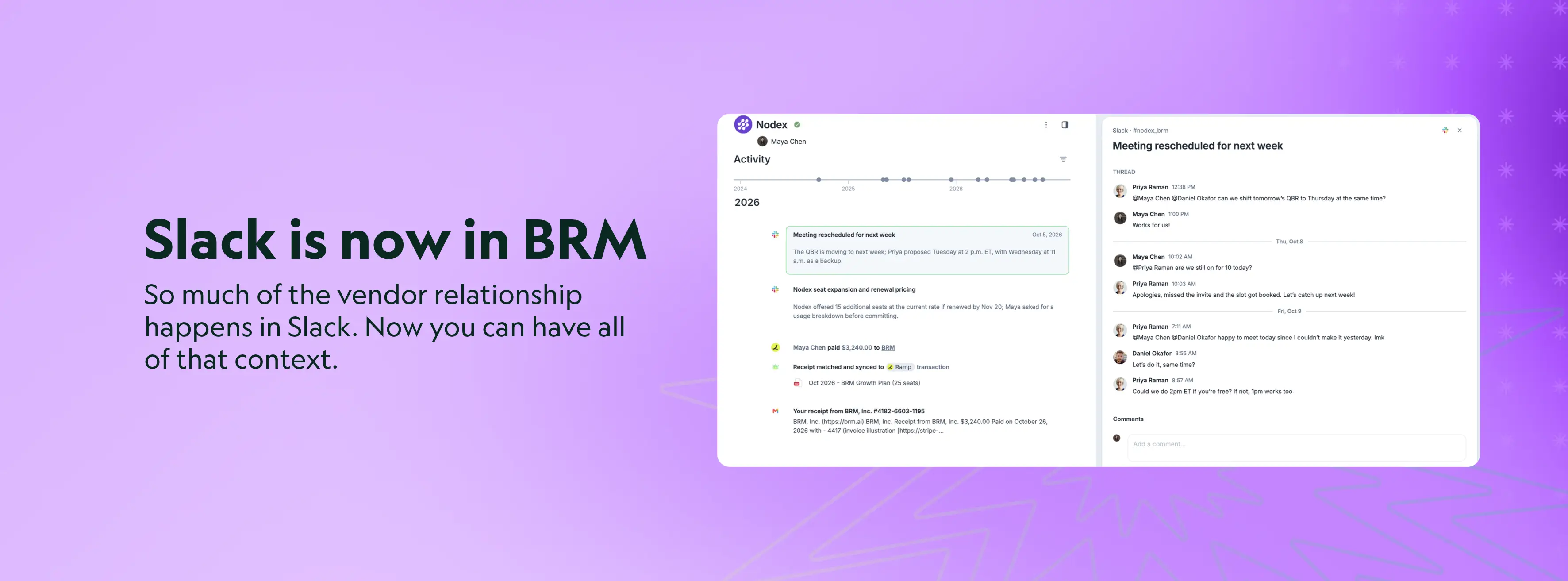
Your vendor history was trapped in Slack. Now BRM puts it to work.
The contract says what you signed. The invoices say what you paid. Neither tells you why you renewed at that price, what the account manager promised in March, or how badly the last outage actually went.
That story lives in Slack; in the shared channel where someone asks a quick question about tokens, where renewal terms get floated long before anyone opens a redline, where the order form gets chased until it’s signed. When something breaks, Slack is where everyone goes first, and those threads are the most honest record of how a vendor performed and how your team feels about them.
Until today that record evaporated. Your champion leaves. Their account manager rotates. Eighteen months later, nobody on either side remembers how the relationship got here.
Today, we’re bringing your vendor Slack channels into BRM to build a more complete Relationship.
@BRM, and the history starts working for you
Add @BRM to any shared vendor channel, the same way you’d add a teammate. BRM Agents identify which vendor the channel belongs to and start capturing the conversation from that moment on. Nothing is read until you invite BRM in.
From chaos to exchanges
Slack conversations sprawl. One topic spans three threads, a side DM, and a week of silence. BRM reads the channel and groups it into exchanges: one subject, from the moment it was raised to the moment it was settled. An exchange opens, updates as the conversation continues, and closes when the matter actually resolves.
Exchanges are Slack’s counterpart to an email thread or a meeting record. Together they form the communication layer of every Relationship in BRM, now spanning email, meetings, and chat, sitting on the same timeline as payments, matched receipts, token usage, and contract amendments. Comment on an exchange to pull in a teammate, or deep-link straight back to the moment in Slack.
Only the files that matter
Vendors send order forms, security questionnaires, and redlines through Slack as often as email. Every file shared in a connected channel runs through the same relevance checks as an email attachment. What matters is added to the Relationship context. What doesn’t, stays accessible without polluting the context, and your judgement.
Context that goes to work
Ask BRM what a vendor committed to in your shared channel, and it answers with the whole Relationship in view. When you counter on terms or draft a renewal reply, BRM Agents draw on what was said in the channel, not just what’s in the contract.
Exchanges are also available through MCP and the API. Every answer respects the permissions of the person asking.
Your negotiations stay yours
New data source, same permissions model. Slack channels in BRM follow the exact rules your email already does. Channel members can always read their exchanges. Anyone else needs access to the vendor and permission to read its Slack conversations. Connecting or moving a channel takes a permission of its own. Nothing gets broadcast, and nobody sees a negotiation they couldn’t already see.
Why this matters
Every vendor relationship has two records. The first is the artifacts of the transaction: the contract, the journal entry, the compliance certificate. There are systems built to store those. The second is the story: a story of trust and partnership, or of broken promises and quiet deception. It’s what was promised, what was conceded, what went wrong, and why you stayed anyway. That’s the record that decides whether you expand the partnership or search for a new one. It’s the memory of every handshake: whether their word held up better than the paper it was written on. And until now, nobody kept it.
Not even the vendor’s CRM. It captures what one rep chose to log about one side of the deal. BRM captures the relationship itself: the artifacts and the story, from every channel the conversation actually happens in.
Our purpose is to power business relationships, and you can’t power a relationship you can only half remember. With Slack joining email and meetings, BRM now holds both records in one place. Whoever picks up a vendor next walks in knowing everything that was said.
Deel’s procurement team has grown fast. With BRM in their vendor channels, every new teammate starts from the full history of every vendor, not from zero.
“Our vendor conversations used to disappear into Slack. Now we never lose context, and we know exactly what every vendor promised.”
- Sasha Sova, Team Lead, Procurement, Deel
Slack in BRM is live today for every customer. Add @BRM to any shared vendor channel to start building the full picture of your vendor relationships. Read more about it in our Help Center article here.
Not a customer yet? Book a demo, and we’ll show you every vendor relationship, with every conversation that shaped it.
Power to the buyers.
More articles
Keep reading on procurement and strategy
Best Practices
How to Detect Unauthorized AI Tools at Work
A step-by-step guide to finding the AI tools your teams use without approval, using network monitoring, security software and the financial record, then keeping them governed.
Best Practices
Why Vendor Management Is Becoming an AI Problem | BRM
The software you bought last year may now run AI you never evaluated. Here is how AI changes vendor risk, contracts and SLAs, and what an AI-ready vendor management office needs.

